Workflow AutomationFollow-ups, reminders and reports that run themselves.

The routine steps between people and tools happen on their own: a lead is assigned, a reminder goes out, a report lands in your inbox. We map how the work moves today and build the automation on the tools you already use.Leads assigned, reminders sent, reports delivered: the routine steps, running on the tools you already use.

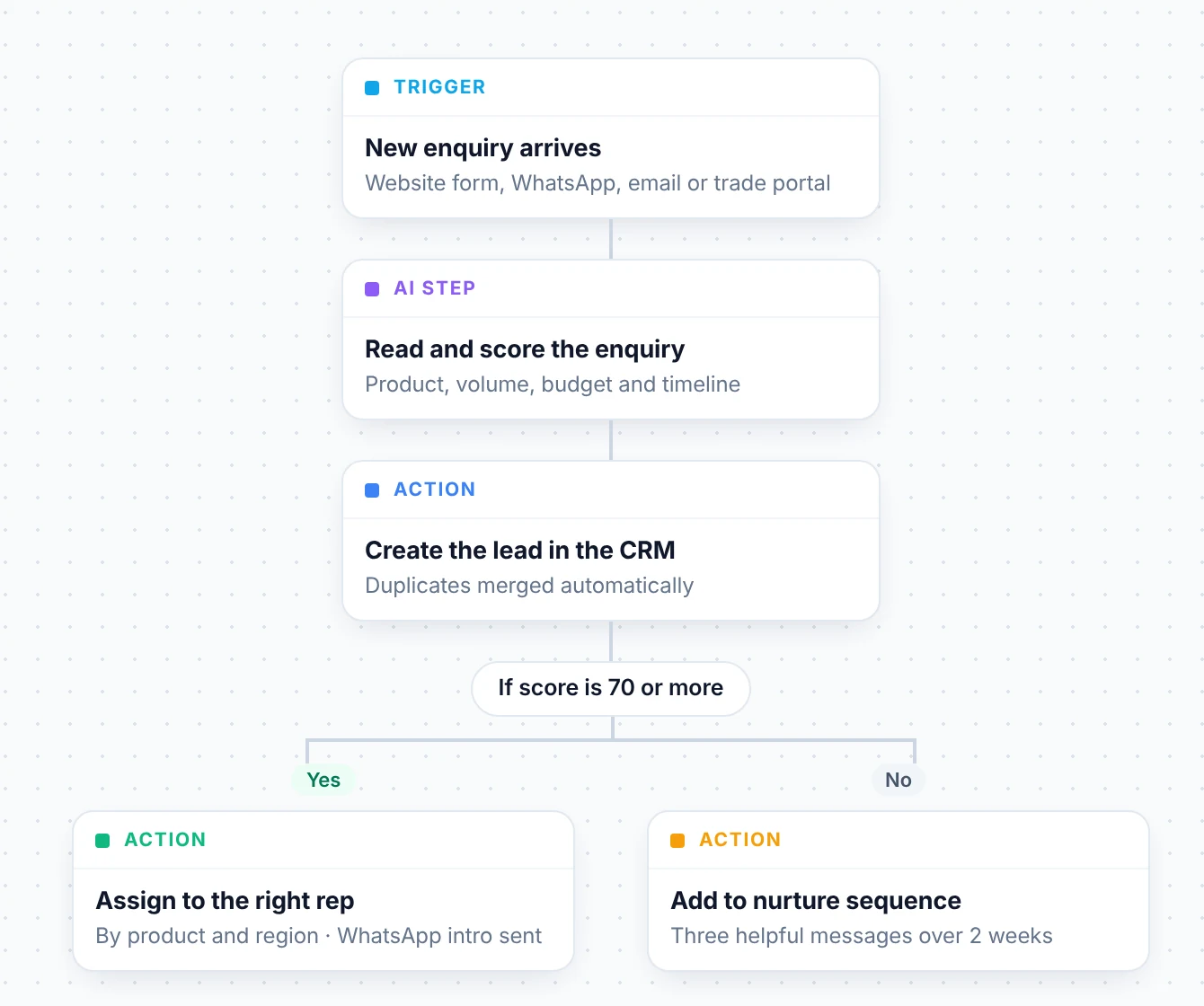
A workflow that reads and scores each new enquiry with AI, creates the lead in the CRM and assigns it to the right rep, or adds it to a nurture sequence
TriggerNew enquiry arrivesWebsite form, WhatsApp, email or trade portal
✦ AI stepRead and score the enquiryProduct, volume, budget and timeline
ActionCreate the lead in the CRMAssigned to the right rep, follow-up booked

What we automate mostSix workflows that give teams their week back.

Lead follow-up

By handLeads sit in an inbox until someone notices.

AutomatedEvery lead is assigned in seconds and followed up on day 1, 3 and 7.

Payment reminders

By handSomeone has to remember to call.

AutomatedReminders with a payment link go out on schedule. Accounts hears only about exceptions.

Approvals

By handRequests get stuck in someone’s chat.

AutomatedEach request goes to the right approver, with reminders and a record of who said yes.

Reports

By handMonday’s numbers are pieced together from five tools.

AutomatedThe report is in your inbox or on WhatsApp at 7:30 am.

Onboarding

By handThe same welcome steps, done by hand every time.

AutomatedDocuments, accounts and welcome messages set up automatically.

Data entry

By handDetails copied between forms, sheets and the CRM.

AutomatedData moves between your tools on its own, checked for duplicates.

Built on your tools

All integrations
  • WhatsApp
  • Google Workspace
  • Zoho CRM
  • Razorpay
  • Zapier
  • Make
  • Zoho Flow
  • Microsoft 365
  • n8n
  • Slack
  • Power Automate
  • Pabbly Connect

And any tool with an API.

How we build a workflowWe start with the people who do the work.

  1. 01

    Map the process

    We sit with the people who do the task and write down every step, tool and exception.

    Product

  2. 02

    Design the flow

    Triggers, steps, conditions, and who gets told when something needs a person.

    ProductDesign

  3. 03

    Build on your tools

    We connect the systems you already use and add only what’s missing.

    Software engineersAI engineers

  4. 04

    Test with real cases

    We run last month’s real examples through it, including the awkward ones.

    Software engineersProduct

  5. 05

    Launch, then hand over

    With a plain-language map of every workflow, or a support plan.

    DevOps

Built to be dependableAutomation you can stop thinking about.

  • Runs on your tools

    No new system for your team to learn unless one is truly needed.

  • Every run is logged

    You can see what ran, when, and what it did.

  • Alerts when something fails

    A failed step pauses and alerts someone instead of guessing.

  • People handle the exceptions

    Anything that needs judgement goes to the right person.

  • Documented

    A plain-language map of every workflow we build.

  • Easy to change

    New branch, new price list, new step: changes are straightforward.

Enquiry workflow · live runsUpdating
  • Lead assignedMeridian Packaging · to RahulDone1.2 s
  • Quote sentBrightline Pharma · blister foilDone0.8 s
  • Follow-up bookedOrchid Cosmetics · Tue, 11 amDone0.6 s
  • Nurture message 2 sent3 enquiries under 70Done2.1 s
  • Large order, price checkSent to sales with details⚠ To a person
  • Lead assignedDelta Auto Parts · to KavyaDone1.0 s
  • Lead created in CRMCRM slow, retried onceRetried9.4 s

Runs today

1,284

Completed

99.6%

Sent to a person

3

DIY automation tool or custom workflow automation?

For a simple two-step task, a DIY tool is often enough, and we’ll say so.

QuestionDIY automation toolBuilt by BlackSynq
Best forSimple, two-step tasksProcesses with exceptions and several tools
Who maps the processYou doWe do, with your team
When a step failsYou find out laterIt pauses and alerts someone
DocumentationWhatever you writeA map of every workflow, handed over

Built by usAutomation we’ve built.

Workflow Automation FAQQuestions, answered.

Something else? Ask us on a free 30-minute call.

Updated · BlackSynq team

What can be automated?

Any step that follows a rule: moving data, sending messages, assigning work, creating documents and chasing approvals. Steps that need judgement stay with your team.

Do we need new software?

Usually not. We build on the tools you already use and add only what is missing, and we explain why first.

What happens when an automation fails?

Each run is logged. If a step fails, for example a tool is down, the run pauses or retries and someone is alerted, so nobody gets a wrong message. On a support plan, our DevOps engineers get that alert too and fix the cause.

Can workflows send WhatsApp messages?

Yes, on the official WhatsApp Business Platform, with approved templates and only to customers who opted in. If WhatsApp is your main channel, Rewavy, our WhatsApp AI platform, may already cover it.

What does automation cost?

Every project is quoted in writing after the first call, before you commit. What drives the cost: how many steps and systems are involved, how many exceptions the process has, the volume it runs at, and whether you want support after launch. We quote in your currency.

Who will build our project?

Our own engineers: AI engineers, software engineers, DevOps and product, most with computer science degrees. Nothing is outsourced, and you talk to them from the first call.


RelatedOften built together

Service

AI Agents

Let an agent answer and qualify enquiries, then hand them to your workflows.

Explore AI Agents

Service

Custom AI and Software

Give your workflows one record to read from and write to.

Explore Custom AI and Software

Overview

All services

Not sure what you need? Start with the problem.

See all services

Tell us one follow-up your team chases every week.

We’ll show you how it would run on its own.

Free call. You talk to the people who’d build it.